The full review
A restaurant can look perfect until I check where to leave the car and notice I also need fuel. That is the Google Maps decision I care about: not just finding dinner, but making the reservation, the stop beforehand, and the walk from parking fit together. I judge its reviews against practical arrival details, then look at how fuel and charging searches support the plan. My less obvious finding is that the restaurant pin is often the wrong place to start navigation; the parking entrance can matter more than the dining room.
Part 1 · 1 of 3Save dinner and the parking entrance together
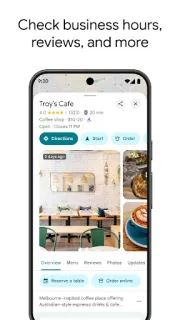
I start by opening the restaurant’s place page rather than immediately tapping Directions. I look through opening hours, food photos, reviews, and any reservation option offered there. Then I save the restaurant to a custom list. That gives me a short list I can revisit without repeating the search, but I still need to establish how I will arrive.
I search nearby for parking, fuel, or EV charging before settling on the restaurant. As a real estate agent working from the car, I care about this sequence because an appealing stop can become awkward when the entrance sits on the opposite side of a divided road. I save the useful arrival points alongside dinner, then check their relationship on the map.
Part 1 · 2 of 3Read the review for the visit you intend
I find restaurant reviews most useful when I read for circumstances rather than praise. A glowing account of a leisurely lunch tells me less about a tight dinner reservation than a specific description of waiting, access, or service. I compare those accounts with photos and the restaurant’s own information. My aim is to identify practical questions, not treat enthusiasm as a guarantee.
A reservation option on a place page is convenient when available, but I distinguish opening a booking flow from holding a confirmed table. I check the party size, time, and final confirmation before planning the drive around it. Then I open Directions and compare the journey with any fuel stop I need. The booking and the route deserve separate checks.
Part 1 · 3 of 3The pin is not necessarily the entrance
I use Street View to inspect the approach when parking looks ambiguous. A restaurant address may lead toward the building while the usable car park entrance faces another street. Street imagery helps me understand that layout before moving, although I treat signs and access rules at the destination as decisive. This is where a little map inspection becomes more useful than another restaurant photo.
I also check the walk between the parking location and the restaurant. Nearby on a map can mean a crossing, a long frontage, or an entrance around the block. For an airport meal before meeting someone, that distinction matters especially: terminal access and restaurant access are not interchangeable. Once I understand the final approach, I can choose a sensible navigation destination.
Dinner with a driving constraint is its strongest fit
I recommend Google Maps most readily to someone choosing a restaurant while also solving parking, fuel, or a charging stop. Its advantage is keeping those decisions in the same geographic view. I would look elsewhere for a reservation-first experience built around table availability, or use a charging operator’s app when session access is the main concern. Maps is my practical shortlist and arrival planner; I would not make every restaurant or charger decision inside it.
The listing, as we read it
- Developer
- Google LLC
- Version
- Varies with device
- Updated
- Nov 4, 2026
- Installs
- 10,000,000,000+
- Rating
- 3.4 out of 5
- Content rating
- Everyone
- Category
- Travel & Local
- Price
- Free
- In-app purchases
- No
- Ads
- Yes
Source: Google Play listing for com.google.android.apps.maps · read Nov 9, 2026
I read Google LLC’s Travel & Local listing as an offer combining navigation with local discovery. Google Play marks it as free to install and containing ads. For restaurant decisions, I keep promotional visibility separate from my assessment of reviews, photos, access, and booking suitability.
I read the latest update notes as maintenance: bug fixes intended to improve finding places and navigating to them. They give me no reason to change my restaurant-planning routine. I would judge this release by the same essentials—usable place pages, clear routes, and a manageable arrival plan.
Check the stop that could upset the reservation
Part 2 · 1 of 4Route options need a reason, not a default habit
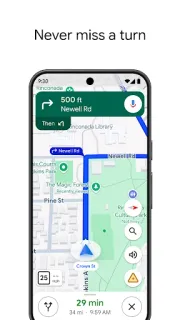
I review Route options when a restaurant trip includes an unfamiliar road network. Avoiding tolls or highways can change the approach, so I compare the resulting route rather than assuming an avoidance choice is automatically helpful. I also consider fuel-efficient route options where offered. For a timed reservation, I weigh the route’s estimated arrival against the practical shape of the journey.
I prepare an offline map of the area when weak reception is likely, particularly if dinner follows a rural drive. That is a fallback for mapping and driving navigation, not a substitute for current traffic or fresh restaurant information. I settle the booking while connected and keep its confirmation accessible separately. The useful distinction is between knowing the roads and knowing what is happening now.
Part 2 · 2 of 4A charging pin is a candidate, not a promise
I approach fuel and charging searches differently. For fuel, I concentrate on location, access, and whether the stop fits the direction of travel. For charging, I also need compatibility and a way to start the session. I inspect available place details, then use the operator’s information for the operational checks. A charger beside a restaurant is attractive only if it suits the vehicle.
I apply the same caution to parking results. A marked parking location does not guarantee an available space or permission to remain throughout dinner. I check the location’s information and read the signs on arrival. With a car rental, I would establish the vehicle’s fuel or charging requirements before choosing a stop. Maps can organize candidates; it cannot remove those physical constraints.
Part 2 · 3 of 4Plan backward from the table, not forward from the car
I begin with a restaurant and a plausible booking time, then inspect parking and the walking approach. Next I search for fuel or charging along the intended journey rather than simply choosing the closest result to my starting point. That order exposes inconvenient detours early. Only after those pieces look workable do I commit to a reservation and set up driving directions.
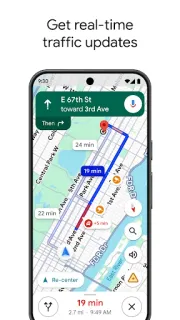
I leave room for the stop instead of treating the driving estimate as the entire outing. Automatic rerouting can respond to traffic, incidents, and closures, but it cannot make a queue at a pump or a slow meal disappear. When plans involve flights, I am particularly reluctant to squeeze a restaurant booking between tightly linked commitments. I prefer a workable sequence over an optimistic arrival estimate.
Part 2 · 4 of 4One map beats scattered searches, with a clear handoff
I could choose dinner in a reservation service, search separately for parking, and open another service for fuel or charging. That approach can offer more focused information at each step, but it makes the geography harder to compare. Google Maps earns its place by showing how the restaurant and supporting stops relate. I can reject an awkward combination before getting absorbed in the menu.
I still favor a handoff when a specialist service controls the actual transaction. I use the restaurant’s booking flow for table confirmation and the charging operator’s app for session requirements. Maps remains the connective layer between those tasks. That is a narrower recommendation than calling it an all-purpose travel solution, but it matches the dinner-and-driving problem much better: compare here, confirm where the commitment happens.
Keep Maps for the approach, not every promise
I value the way Google Maps lets me challenge a restaurant choice with the surrounding geography. Reviews help me choose a meal; parking and roadside stops help me decide whether that choice works for this trip.
My reservation is about certainty, not scope. A place result is not a confirmed table, an open parking space, or an assured charging session. I get the most from Maps when I use it to narrow the options and make those final checks deliberately.
What I like
- I can compare dinner and essential stops on one map.
- I can save restaurants and arrival points together.
- I can inspect unfamiliar approaches with Street View.
- I can compare routes before committing to a booking.
What I'd change
- I still need a separate reservation confirmation.
- I cannot infer parking availability from a pin.
- I need operator checks before relying on a charger.
Google Maps FAQ
Can I reserve a restaurant table in Google Maps?
I look for a reservation option on the restaurant’s place page. Where available, I follow the booking flow and check the final confirmation rather than assuming the initial tap secured a table.
How do I find parking near my restaurant?
I search for parking around the restaurant, inspect the entrance, and check the walking route. I verify restrictions at the location before leaving the car.
Can I find fuel before heading to dinner?
I search for fuel near the planned journey and compare the access with my direction of travel. I care more about a convenient approach than straight-line closeness.
Is a charging result enough to plan dinner around?
I treat it as a starting point. I check compatibility and the operator’s current information before making the charger essential to my reservation plan.
Will an offline map cover the whole restaurant trip?
I use offline maps as a fallback for roads and driving navigation. I confirm the restaurant booking while connected and avoid relying on offline access for live traffic or fresh place information.
 TipsTownSq Community

 CompareWedding Planner by MyWed
 TipsBend
 TroubleshootingFood City