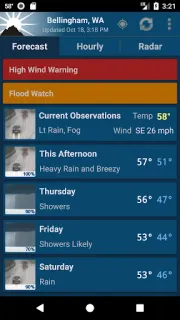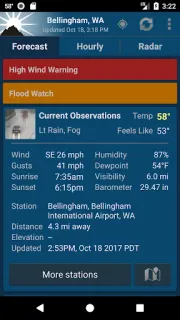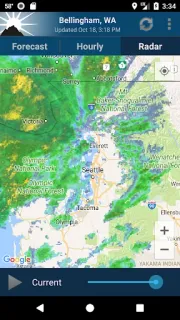
A forecast for the nearest city can miss what is happening at a trailhead or campsite. NOAA Weather Unofficial uses point forecasts tied to your location, which can make it a more useful check before a hike, ski day or other outdoor plan. I’d start by choosing how to set that location: let nearby cell towers and Wi-Fi help find it, use GPS for a more precise position, or enter a place manually. That choice is the first setting worth considering, especially if you want a local forecast without keeping GPS in use.
The app brings together current conditions, hourly forecasts, animated radar and forecast information from NOAA and the National Weather Service. Severe weather appears at the top of the forecast, making it easier to notice while checking the day ahead. The developer says forecasts use a point location rather than a nearby city, a distinction that matters when terrain or distance makes a city forecast less relevant. Recent notes describe a backup source for observations and an update to NOAA satellite imagery. For a moving checklist, it can help with timing a loading day; for car maintenance outside, an hourly forecast may help you pick a dry window. It is a weather tool, not a smart thermostat or a broad planning suite.
The main limits are geographic and practical: point forecasts from the National Weather Service make this a U.S.-only app, and ads are included. It is free to install, but I would check the Google Play listing for any in-app purchase details before proceeding. Location access is useful for a forecast at your current position, but manual location entry is an alternative if you prefer not to use it. The app is unofficial and is not affiliated with NOAA or the National Weather Service; it uses their public-domain products. Consider the location choice and the ad-supported format before relying on it as your only source for weather alerts.
I’d install it if I spend time outdoors in the U.S. and want a location-specific forecast, radar and hourly conditions together. I’d skip it if I need forecasts outside the U.S., want an ad-free experience, or would rather check weather without setting a location. On day one, I’d choose between GPS, nearby networks and manual entry based on how precise I need the forecast to be. Check the Google Play button just below to see whether this app fits that routine.