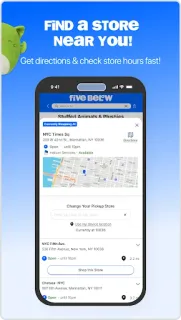
A last-minute classroom prize list can turn into a dozen little decisions: something for a game, a few colorful extras, perhaps a treat for the teacher. I’d use Five Below to scan toys, candy and party supplies before setting out, rather than wandering aisles hoping inspiration appears. Search and filters give a loose list some shape, and nearby-store browsing helps connect online browsing with an in-person errand. For a real estate agent working between appointments, that can be more practical than trying to plan a full shopping trip at a desk.
The app covers a broad mix, including toys, games, earbuds, fitness gear, makeup, graphic tees, books and room décor. I can search for an item or narrow browsing with filters, check what is available through the shopping experience, and look for nearby Five Below stores. The store describes most items as falling in the $1–$5 range, alongside some higher-priced finds. For an online marketplace-style browse, I’d treat that range as a starting point, not a promise that every item costs the same.
The main comparison is the item price against the effort and cost of getting it. Delivery may add expense, while a store visit takes time; I’d check the available options at checkout before deciding which is the better bargain. The listing describes card payments and express checkout options, but I’d still review the final total and payment choice carefully. If you prefer to shop without creating an account, check what the app asks for as you proceed; I wouldn’t assume every checkout route works the same way. Coupons or cashback should not be part of the decision unless they appear as an available offer in the app.
I’d install Five Below if I regularly want inexpensive extras, browse gift cards or gifts alongside everyday finds, or like checking a store before making a trip. It is less compelling if I need a tightly curated range, exact stock certainty, or a single item delivered at the lowest possible total. On my three-year-old Pixel, I’d also keep the shopping session focused rather than leaving a long browsing tab open between errands. If the mix suits your list, use the Google Play button just below to open the listing and check the app details before installing.