A grocery list can look straightforward until a familiar brand comes in several sizes or varieties. I’d use WICShopper while planning a shop or standing by the shelf: scan the product, check its WIC eligibility, then decide whether it belongs in the cart. That quick check is especially useful when I’m squeezing groceries into a busy day and don’t want to rely on packaging that looks similar to a product I’ve bought before. It won’t replace the list, but it can make the list easier to act on.
The app lets participants in supported WIC programs scan products to check eligibility. In most supported programs, you can register an eWIC card and see current benefits; the app can also tell you whether enough benefits remain for a product. That makes it more specific than a general price comparison or coupons app: the point is to check whether a grocery item fits your WIC benefits, not to find the lowest shelf price. I’d use it alongside my usual routine, checking a product before I commit to it.
The main catch is program coverage. WICShopper supports programs in specific states and some tribal programs, and it will not work with other WIC programs; check that your program is included before you build a routine around it. Registering an eWIC card is optional in most supported programs, but it is needed for the automatic current-benefit view described in the listing. The app is free to install. Its latest notes mention minor fixes, enhancements for document uploads, and a fix to analytics reporting, so those notes may matter if you use document uploads.
I’d install WICShopper if I participate in a supported program and want a product check close at hand during grocery planning. I’d skip it if my WIC program isn’t supported, or if I’m looking for a general online marketplace, delivery tracking, gift cards, or cashback tool. If it fits my program, I’d check the Google Play listing using the button just below before installing.
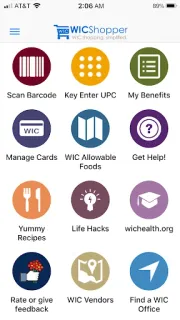
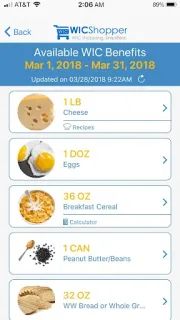
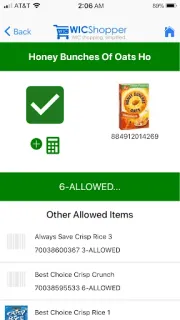
 How-toWICShopper