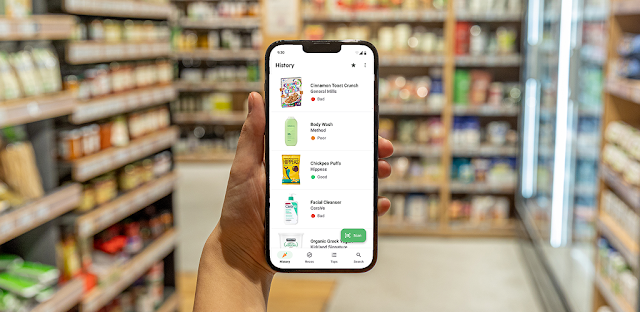
At a shop shelf, two jars look similar, but their ingredient panels take time to compare. I’d use Yuka to scan each and get a color-coded assessment as a starting point; that is more practical than trying to remember every ingredient while shopping. For a personal-care item, the same quick check can help me decide which label deserves a closer read. The app is most useful when a product has a barcode and I want a prompt, not a final verdict.
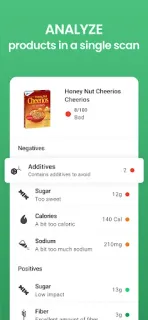
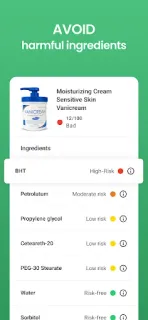
Yuka scans food, beauty and personal-care products, then gives each a color-coded result: excellent, good, mediocre or poor. Its food score draws on nutritional value, additives and organic status. For beauty products, it assesses ingredients and assigns risk levels based on scientific research. Each product has a detailed information page, and a poor result can lead to a recommendation for a similar product with a better score. I’d open that detail page before changing a regular purchase, since it gives more context than the color alone.
A scan depends on finding the product in the app’s catalog, so it may not answer every shelf-side question. A score is a screening aid, not a substitute for reading the label or deciding what matters to you. Yuka is free to install and offers in-app purchases, so check the Google Play listing for purchase details before choosing to pay. For a quieter phone, review Yuka’s notification permissions after installing and keep only alerts you find useful; you can also leave notifications off and scan when needed.
I’d install Yuka if I often compare packaged foods or cosmetics and want ingredient information in a more readable format. It may be a poor fit if you expect every product to appear, want a personalized meal planner, or would rather assess labels without scores. People who prefer a fitness tracker or workout plan will find this app focused on product choices instead. Check the Google Play button just below if that scan-and-review approach suits your shopping routine.

 How-toYuka