
The referee starts the match while you are still juggling a bag and trying to see the pitch. If the club is streaming through Veo, a go-live notification can get you to the match without hunting through messages. The first snag is often practical: a stream on a phone can be hard to follow from the touchline or a busy sideline. Veo can cast to a screen using Chromecast or AirPlay, so check that the receiving device is available before kickoff rather than troubleshooting during play.
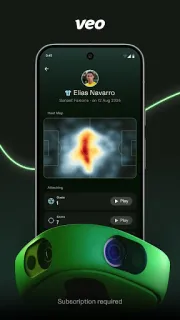
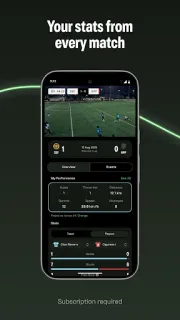
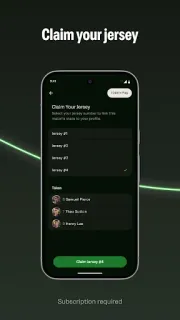
Veo brings together matches recorded with Veo cameras, live streams and on-demand playback. You can jump to key moments, then revisit the full match after the final whistle. For teams using Analytics 2, players can claim a jersey and see figures such as distance covered, sprints, top speed, shots and passes; tapping a stat opens the moments behind it. Coaches and families may also find the match’s top performers and teammate comparisons useful. If you are running a stream, Producer Mode can manage the livestream and keep the score from the sideline.
The main catch is that access depends on what your club uses. Player performance features require an active Analytics 2 subscription for the club, while Producer Mode requires an active Veo Live subscription. So an app install alone does not guarantee those tools will be available. For live viewing, a notification only helps if notifications are allowed and the club’s match is being streamed; for recordings and stats, the relevant Veo camera and club setup matter too. Sort out access with the team before relying on a feature on match day.
I’d install Veo if my club records matches with Veo cameras, or if I have a clear role watching or producing its streams. It is less useful if your team uses a different recording setup or you only want general live sports streaming: this app is centred on a club’s own Veo matches. Players should ask whether their club has Analytics 2; sideline stream operators should check for Veo Live access. If that fits your team, use the Google Play button just below to open the listing and check the app details before installing.
 TipsVeo